Why is my plug-in not listed in my Dashboard?
How do I activate my plug-in?
How do I manage my activations? (revoke, re-activate)
Why is my plug-in not listed in my Dashboard?
Registering your sonible plug-in(s)
In case you purchased your sonible plug-in from a retailer or as a guest in our shop, you can still register your plug-in in your sonible account in order to stay on top of your activations. Log into "My Account", paste in your license key and hit "Register license key"(make sure to enter the hyphens as well).
How do I activate my plug-in?
There are two ways to activate your plug-in:
machine-based in your DAW with the license key (sonible licensing system)
optional: in your iLok license manager for iLok Cloud or USB Dongle use. See How do I use sonible plug-ins with iLok?
In total, two simultaneous activations are possible: Either 2 machine-based or 1 machine-based and 1 via iLok.
To create a machine-based activation, open the plug-in in your DAW of choice. If the activation-window doesn’t pop up automatically, go to the settings page and click on “Register now”. Enter the license key to activate the plug-in on your device. Check here for information on how to manage activations.
If you encounter any issues concerning the machine-based activation of a sonible plug-in, please pay close attention to the error message. Most of the issues can be quickly fixed with instructions provided here. If you need further assistance don't hesitate to reach out to us directly.
How do I manage my activations?
Dashboard overview:
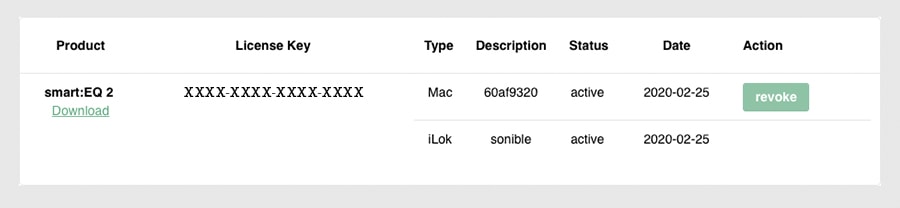
Within your user area dashboard we offer flexible self-service license management. You can revoke/re-activate machine-based activations as often as necessary. Once you create a machine-based activation or transfer it to your iLok, it will show up next to the corresponding license key. Before the first activation, "not activated" will be displayed.
Activations – what are my options?
the plug-in can be active on two devices simultaneously. (active)
up to 5 devices can be registered. (active + pending, check out the graphic below)
one activation can be transferred to iLok
Activate on a new device:
If you haven't reached the limit of two active activations, no action is necessary in the dashboard. Simply activate the plug-in in your DAW.
If there are already 2 active devices, you need to remove one of them first:
Remove a device:
Press the "revoke" button next to an unused device activation (status will change to pending) and, if possible, open the plug-in on that device once more to complete the process (status will change to inactive).
Re-activate an old device:
If you want to use a plug-in on a device you previously revoked (pending or inactive), press the "re-activate" button. You might be prompted for your license key again, when you open the plug-in for the first time.
iLok (optional):
If you are an iLok user, we grant one iLok transfer. Use the “transfer to iLok” button on your dashboard and read the instructions carefully. Note: you can’t revoke iLok transfers yourself. If you don’t want to use iLok anymore, you need to contact support.